
Cinematic White Dress AI Photo Prompt | One Easy Prompt
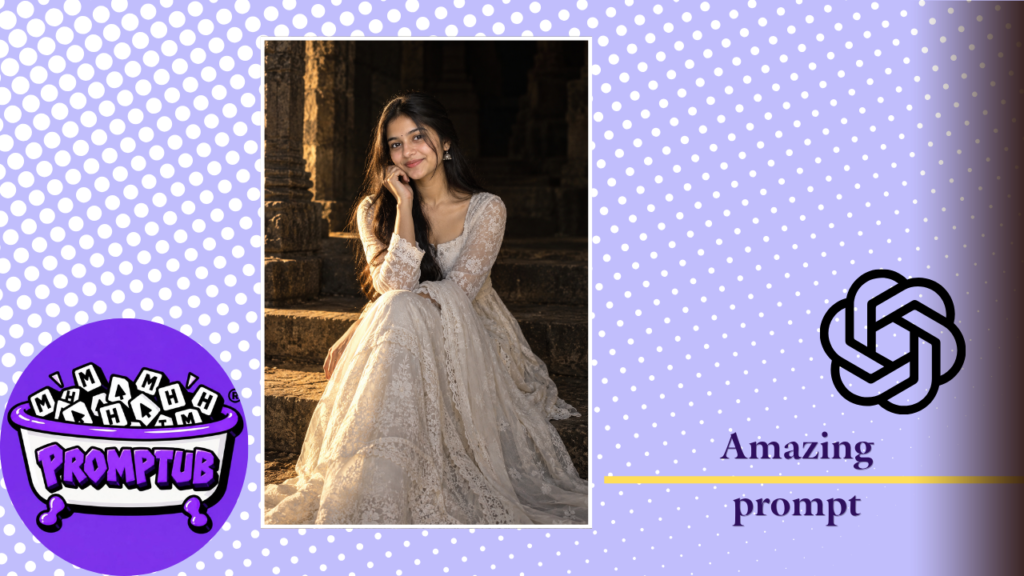
Create a realistic cinematic AI portrait in a flowing white lace dress with warm golden lighting, ancient stone steps and a dreamy dark background. Copy the prompt from Promptub.
More results from this prompt
ChatGPT result
Create a beautiful cinematic portrait using this white dress AI photo prompt.
Where Can You Use This Cinematic AI Photo?
Once you have created your portrait, you can use it in several creative ways, depending on the platform’s terms and your intended use.
- Instagram posts and Stories
- WhatsApp status updates
- Pinterest inspiration boards
- Personal profile pictures
- Creative photography collections
- AI photo editing demonstrations
For Instagram Stories and Reels covers, a vertical 9:16 composition can work particularly well. For a traditional portrait post, a 2:3 image may provide a more balanced frame.
This photo style combines a flowing ivory-white dress, delicate lace details, warm golden lighting and an ancient stone background to create an elegant, movie-like atmosphere.
The soft smile, natural pose and dramatic shadows give the portrait a dreamy and timeless look. If you want to transform your ordinary photo into a cinematic portrait, this prompt is a great starting point.
Simply upload your reference photo to an AI image generator, copy the prompt below and generate your own version. For the best results, use a clear photo with your face visible.
How to Create This Cinematic AI Photo
- Choose a clear photo of yourself or the person you want to use as a reference.
- Open an AI image generator that supports image uploads.
- Upload your reference photo.
- Copy the cinematic white dress prompt from this page and paste it into the prompt box.
- Generate the image and save your favourite result.
Tip: Use a well-lit reference photo with clearly visible facial features. AI results may vary depending on the image generator you use.
Can You Use Your Own Photo?
Yes. You can use your own photograph as a reference when your chosen AI image generator supports image uploads. This helps guide the generated image toward your preferred appearance while allowing the setting, clothing and lighting to change.
For a more recognizable result, use a clear reference image and include instructions to preserve the person’s natural facial features. However, facial similarity is not guaranteed, and the final output depends on the image model and its reference-image capabilities.
Always use photographs that you have permission to upload and edit.
Best Settings for a Cinematic AI Portrait
For this particular style, a vertical composition works well because it allows the flowing dress, seated pose and surrounding stone steps to remain visible in the frame.
Recommended visual direction:
- Style: Photorealistic cinematic portrait
- Outfit: Flowing ivory-white lace dress
- Lighting: Warm golden side lighting
- Background: Dark ancient stone ruins
- Mood: Dreamy, elegant and mysterious
- Composition: Full-length vertical portrait
- Details: Natural skin texture, realistic fabric and dramatic shadows
If your AI tool offers aspect-ratio settings, try 2:3 or 9:16 depending on whether you want a portrait photograph or a vertical social media post.