
Create Your Own Navratri Profile Picture With Prompt
This prompt creates a close-up portrait with a moody, cinematic feel. A deep black background lets the subject's face and silver jewellery take all the attention. The styling is rooted in Navratri fashion, but the dark, studio-style lighting gives it a modern editorial look instead of a typical festive photo. The result is dramatic, elegant and very scroll-stopping, which is why this style performs so well on Instagram Reels, Pinterest and WhatsApp status.
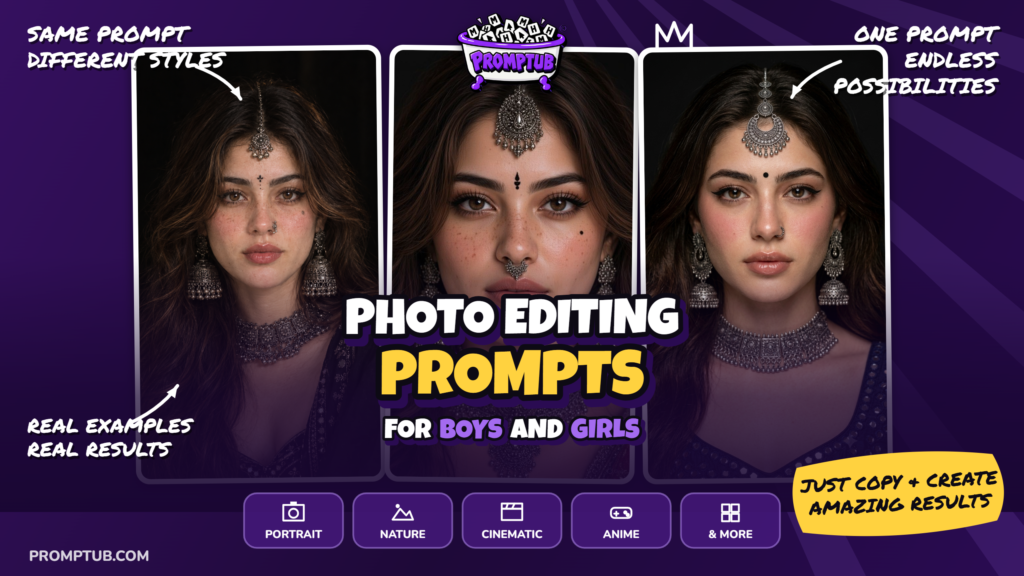
More results from this prompt
ChatGPT result
Gemini result
Grok result
Why the style worksThree things make this look stand out. The first is contrast. Oxidised silver reflects light beautifully against pure black, so every detail of the jewellery shows up sharply. The second is the skin treatment. Dewy, glowing skin with rosy flushed cheeks gives a fresh, lifelike finish that avoids the over-smoothed, plastic look many AI portraits have. The third is the jewellery. The maang tikka, large jhumkas, ornate choker and nose ring together create a complete traditional Indian look that is instantly recognisable and culturally rich.
Breaking down the promptThe opening line, "using the uploaded girl as the ONLY face reference", tells the AI to build the image around the face in your uploaded photo. The instructions "preserve her exact natural face structure" and "no face swap, reshaping or whitening" push the tool to keep the real features, skin tone and proportions instead of generating a generic beauty-filter face.The makeup section asks for soft dewy glow, rosy cheeks, sharp black winged eyeliner, defined lashes and glossy nude-pink lips. This combination gives a polished but natural festive look. The jewellery section is deliberately specific (maang tikka, statement jhumkas, ornate choker, detailed nose ring), because naming each piece prevents the AI from skipping or simplifying accessories.The hair line, "naturally voluminous and slightly messy with soft strands framing the face", adds realism. Perfectly neat hair often looks artificial. The final technical lines (deep black background, dramatic soft lighting, realistic skin texture, DSLR photography, 9:16) control the mood, the detail level and the vertical format for mobile.
- Open an AI image tool that supports reference images, such as Gemini, ChatGPT, Grok or a similar generator.
- Upload one clear photo of the person. A front-facing shot with good lighting and no heavy filters gives the best likeness.
- Paste the full prompt exactly as given and generate.
- If the face drifts from the original, regenerate and repeat the line "preserve exact face structure" at the start of the prompt.
- Pick the best result, then upscale it if you want true 4K quality.
- Use a sharp, well-lit reference photo. A blurry or heavily edited input leads to a weaker likeness.
- If the jewellery looks too soft, add "highly detailed metalwork, visible engraving and tiny ghungroo beads".
- If the skin looks too smooth, add "visible pores, fine freckles and natural skin texture".
- If the bindi is wrong, describe it directly, for example "small black bindi with three dots below, centred on the forehead".
- Generate several versions. AI tools vary a lot from one run to the next, and the third or fourth try is often the best.