
Guitar Image AI Prompt – Create Cinematic Sunset Guitar Photos
Turn your ordinary photo into a cinematic sunset guitar portrait using our specially created AI image prompt. Copy, paste and create your own aesthetic guitar image.
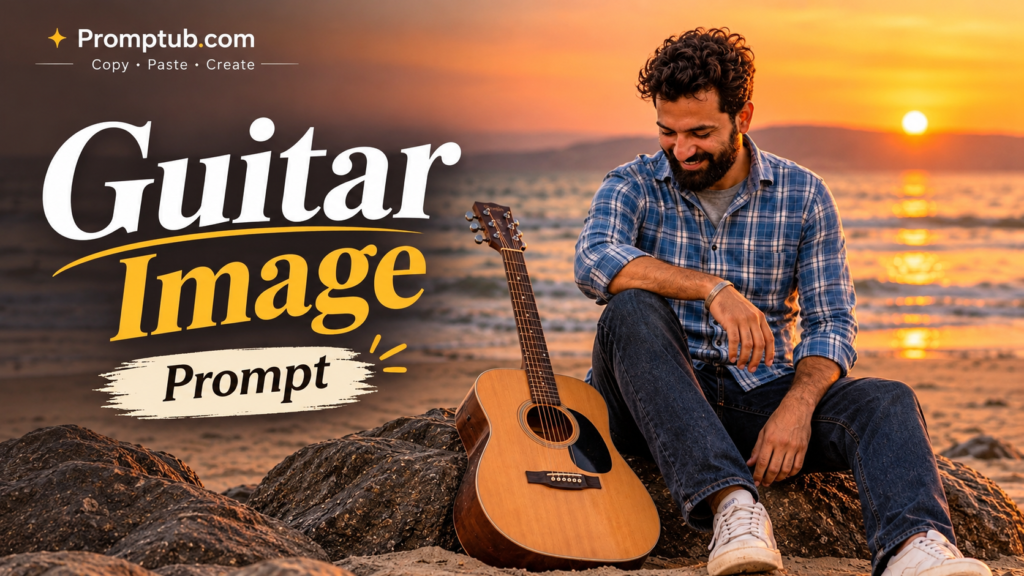
More results from this prompt
ChatGPT result
Guitar Image AI Prompt – Create a Cinematic Sunset Guitar Photo
Have you ever wanted to create a beautiful cinematic photograph of yourself sitting beside an acoustic guitar, enjoying a peaceful sunset? Now you can create this aesthetic photography style using Artificial Intelligence with just one photo and a simple text prompt.
The Guitar Image AI Prompt featured on Promptub is designed to help you transform an ordinary portrait into a beautiful, realistic-looking cinematic photograph. Imagine a warm orange sunset, a peaceful beach, natural rocks, an acoustic guitar placed beside you, and a relaxed sitting pose. The overall scene gives the photograph a calm, artistic and professional photography feel.
This creative concept is developed as an original visual idea for Promptub, combining sunset photography, natural poses and an acoustic guitar into one aesthetic composition. You don’t need to own a guitar, visit a beach or arrange a professional photoshoot. You can use your own photograph as a reference and let an AI image generator create a similar visual scene.
Whether you are looking for an aesthetic Instagram DP, a creative social media post, a cinematic portrait or simply want to experiment with AI photography, this prompt can help you get started.
What Is the Guitar Image AI Prompt?
The Guitar Image AI Prompt is a text instruction that tells an AI image generator how to transform your uploaded photograph into a cinematic guitar-themed portrait.
Instead of creating a completely random person, the prompt instructs the AI to use your uploaded image as the primary identity reference. It describes the desired sitting position, guitar placement, background, lighting, atmosphere and overall photography style.
The main idea is to create a photograph where a person is sitting comfortably on rocks or a natural surface, with an acoustic guitar placed casually beside them.
The background can feature a beautiful sunset, an orange sky, distant mountains, a beach or a peaceful outdoor location. Warm golden-hour lighting adds depth to the photograph and creates a professional cinematic appearance.
The final result is intended to look like a real photograph rather than a digitally generated illustration.
The Creative Idea Behind This Guitar Photography
This image concept is inspired by the peaceful feeling of sunset photography and the artistic connection between music and nature.
A guitar is more than just a musical instrument in this composition. It becomes an important visual element that gives the photograph its overall personality. The relaxed sitting pose, natural surroundings and warm sunset colours work together to create a memorable image.
For this particular visual concept, we chose a beachside sunset atmosphere. The person sits comfortably on natural rocks while an acoustic guitar rests nearby. The sunlight creates a warm orange glow across the surroundings, making the scene feel peaceful and cinematic.
We wanted to create something different from ordinary AI portraits. Instead of simply changing the background or adding a few effects, the concept focuses on creating an entirely new photographic scene while keeping the uploaded person’s identity as consistent as possible.
This is the creative direction behind our Guitar Image Prompt.
How Will Your Guitar AI Image Look?
When you use this prompt with a suitable AI image generator, it aims to create several visual elements.
1. Natural Sitting Pose
The person appears sitting in a relaxed sideways position. One knee can be slightly raised while the other leg rests naturally. The arms should look comfortable rather than stiff or artificially positioned.
The goal is to create a natural photograph that looks like someone captured a beautiful moment during an outdoor photoshoot.
2. Acoustic Guitar Placement
An acoustic guitar is placed beside the person, resting naturally against a rock or another suitable surface.
The guitar should have realistic wooden textures, visible strings, a natural body shape and properly positioned details.
It should look like a real instrument that belongs in the scene rather than an artificial object added randomly to the photograph.
3. Cinematic Sunset Background
The background is one of the most important elements of this image.
A warm sunset creates an orange and golden atmosphere. Depending on the AI generator, the background may include a beach, ocean waves, distant hills, rocks or a natural outdoor environment.
The golden-hour lighting creates a soft glow around the person and adds a cinematic photography effect.
4. Realistic Facial Features
One of the most important instructions in this prompt is to use the uploaded photograph as the primary source of the person’s identity.
The AI should attempt to preserve the original facial structure, hairstyle, skin tone and recognisable facial features.
This helps the generated image remain connected to your original photograph rather than producing a completely different person.
However, AI image generators may sometimes make small changes to facial details. Results can vary depending on the tool and the quality of the uploaded photograph.
5. Professional Photography Appearance
The prompt also describes realistic lighting, natural shadows, detailed clothing textures and subtle film grain.
These details help create a professional editorial photography style.
The overall image should feel warm, peaceful, natural and visually attractive without excessive filters or artificial-looking effects.
Copy the Guitar Image AI Prompt
Ready to create your own cinematic guitar photograph?
Follow the instructions below and copy the complete prompt. You can use your own photograph as the reference image.
Universal Guitar Image Prompt:
Use the uploaded photo as the ONLY source of the person’s identity. Create an ultra-realistic, cinematic aesthetic photograph of the same person sitting sideways in a relaxed, natural pose, with an acoustic guitar casually placed on the ground beside him. The person should look slightly away from the camera, creating a thoughtful and peaceful mood.
Keep the person’s original facial features, hairstyle, skin tone, and identity exactly the same as the reference photo. Natural body proportions, realistic hands, authentic clothing textures, beautiful cinematic lighting, soft shadows, subtle film grain, muted earthy tones, professional photography, realistic background, artistic composition, and a premium editorial aesthetic.
Create a beautiful golden-hour sunset atmosphere with warm orange and golden light. The environment should feel peaceful and natural, with realistic outdoor surroundings, cinematic depth and soft background details.
The acoustic guitar should look realistic, with natural wooden textures, properly shaped strings and accurate instrument details. Keep it naturally positioned beside the person.
The final image must look like a real photograph, not AI-generated. Do not intentionally change the person’s identity, facial structure, hairstyle or original appearance.
Important: Use your uploaded photograph as the identity reference. The generated background, pose and composition can change according to the AI tool.
How to Create a Guitar Image Using AI?
You don’t need advanced photo-editing knowledge or professional photography equipment to try this concept.
Just follow these simple steps.
Step 1: Choose Your Photograph
First, select a clear photograph of yourself.
For better results, choose an image where your face is clearly visible. A photograph with good lighting and sufficient facial detail is recommended.
You can use a front-facing portrait or a photograph taken from a slightly different angle. The AI will use your uploaded picture as an identity reference.
Step 2: Copy the Prompt
Scroll to the Universal Guitar Image Prompt section above.
Copy the complete prompt carefully. Make sure you copy all the instructions because they explain the person’s identity, sitting position, guitar placement, background and lighting.
Step 3: Open an AI Image Generator
You can try this prompt using an AI image-generation tool that supports uploading reference photographs.
Some popular options include:
● Google Gemini – For creating and editing images using text instructions and uploaded photographs.
● ChatGPT – For AI image creation and photo editing.
● Other compatible AI image generators – You can also experiment with tools that support image references and text-based instructions.
The availability of features may vary depending on the tool and your account.
Step 4: Upload Your Photograph
Open your selected AI tool and upload the photograph you want to use.
Make sure the uploaded photograph is the correct one. It will act as the primary identity reference for your new image.
Step 5: Paste the Guitar Prompt
Paste the copied prompt into the AI tool’s message or prompt box.
Submit your request and allow the AI to generate the photograph.
Step 6: Save Your Generated Image
Once the image is generated, review the result.
Check the face, hairstyle, guitar placement, hands, clothing and overall composition. If something doesn’t look right, you can ask the AI to correct that specific detail without changing the entire concept.
Your cinematic guitar-themed photograph is now ready to use!
Tips to Get Better Guitar AI Image Results
Although the prompt provides detailed instructions, the final output also depends on the uploaded photograph and the AI image generator.
Here are some useful tips to improve your results.
Use a High-Quality Reference Photo
A clear photograph with good lighting generally provides more useful facial details for the AI model.
Avoid Heavy Filters
Try uploading an original photograph instead of an image that has already been heavily edited. Excessive filters can make it harder for an AI tool to interpret facial details.
Choose a Photograph With a Visible Face
If your face is covered by sunglasses, shadows or other objects, the AI may struggle to preserve your appearance accurately.
Use the Complete Prompt
Do not remove important instructions about identity preservation, natural proportions or guitar placement. These details help communicate the intended result.
Try More Than One Generation
AI image generation is not always identical. Sometimes the first result may have an incorrect guitar position, unusual hands or an unnatural sitting pose. You can generate another variation or request a small correction.
Don’t Over-Edit the Final Image
The main attraction of this concept is its natural cinematic appearance. Avoid adding too many filters, effects or artificial lighting adjustments after generation.
Which AI Tools Can You Use for This Prompt?
You can experiment with different AI image generators to see which one gives you the most satisfying result.
Google Gemini
Google Gemini is a convenient option for people who want to upload a photograph and describe the changes they want using natural language.
Upload your picture, paste the Guitar Image AI Prompt and request the new composition.
ChatGPT
ChatGPT can also be used for image generation and photo editing. Upload your reference photograph and provide the complete prompt to describe the desired result.
Other AI Image Generators
You can also experiment with other compatible image-generation platforms. Look for tools that support reference image uploads and identity-preserving image editing.
Remember that different AI models may interpret the same prompt differently. You may get slightly different backgrounds, poses, lighting and guitar placements.
Who Can Use This Guitar Image Prompt?
This prompt is suitable for anyone who wants to experiment with creative AI photography.
For Instagram Users: Create a unique aesthetic photograph for your Instagram profile, feed or story.
For Photography Lovers: Experiment with cinematic sunset lighting, natural poses and editorial-style compositions.
For Music Lovers: Create a guitar-themed photograph even if you don’t own a guitar or have never participated in a professional guitar photoshoot.
For Content Creators: Use the generated photograph as inspiration for social media content, creative posts or personal projects.
For AI Photography Beginners: Learn how a simple reference photograph and a detailed prompt can create a completely different visual scene.
You do not need to be a professional photographer or an expert in AI tools to try this idea.
Frequently Asked Questions (FAQs)
1. What is a Guitar Image AI Prompt?
A Guitar Image AI Prompt is a text instruction used with an AI image generator to create a guitar-themed photograph. It describes the person’s pose, guitar placement, background, lighting and photography style.
2. Can I Create This Guitar Image With My Own Photo?
Yes. You can upload your own photograph and use it as the identity reference. The AI will attempt to recreate the scene while maintaining your original appearance.
3. Is This Guitar Image Prompt Free?
The prompt provided on Promptub is available to copy and use. However, the AI image-generation tool you choose may have its own free usage limits, subscription requirements or other restrictions.
4. Can I Use This Prompt in Google Gemini?
Yes. You can try this prompt in Google Gemini if image generation and reference-photo editing are available to your account.
5. Will My Face Remain the Same After AI Editing?
The prompt specifically instructs the AI to preserve your original facial features and identity. However, no text prompt can guarantee a perfect identity match in every generation.
6. Do I Need a Real Guitar to Create This Image?
No. You only need a suitable reference photograph. The AI can generate an acoustic guitar as part of the new scene.
7. Can Girls Also Use This Guitar Image Prompt?
Yes. The prompt can be adapted for different people. You can replace gender-specific pronouns such as “him” with “her” or use gender-neutral wording while keeping the rest of the composition unchanged.
8. Can I Change the Background?
Yes. You can ask the AI to use a beach, mountain location, open field or another peaceful outdoor setting instead of the original sunset background.
9. Why Does My AI Image Look Different From the Reference?
AI models interpret text instructions differently. Differences in the uploaded image, image-generation model, lighting and composition can affect the final result.
Try using a clearer reference photo and keeping the complete prompt.
10. Can I Share My Generated Guitar Photo on Instagram?
Yes. You can share your generated image on Instagram or other social media platforms, subject to the terms of the AI tool you use.
AI photography is making creative photo concepts accessible to everyone. You no longer need to arrange an expensive photoshoot, travel to a beautiful location or own professional photography equipment to experiment with different visual styles.
With this Guitar Image AI Prompt, you can turn an ordinary photograph into a cinematic sunset-inspired portrait featuring an acoustic guitar, a relaxed sitting pose and beautiful natural lighting.
At Promptub, our aim is to make creative AI prompts easy to discover, understand and use. We focus on sharing practical ideas that people can copy, paste and experiment with using their favourite AI tools.
If you enjoyed this concept, try the prompt with your own photograph and explore different variations until you find a result you love.
Copy the prompt, upload your photo and create your own cinematic Guitar Image!
Created with a creative concept by Promptub.com
Copy • Paste • Create
Visit: Promptub.com